
Endorsements FAQ
Check out these helpful FAQs centered around CivicEngine's Endorsement Tool:
Entering Endorsements Early
How early can I enter endorsements?
We recommend beginning to enter endorsements through the endorsements tool roughly six (6) weeks ahead of the election. Check out our Coverage Timeline for important dates related to upcoming elections.
What happens after my endorsement entry is marked as pending?
- If our research team has confirmed that the candidate is running in the election, the status will change from "pending" to "active".
- If our research team has not been able to confirm that the candidate is running in the election, the status will change from "pending" to "not found".
What should I do if an endorsement entry is marked as not found?
When a candidate is marked as "not found", that means our research team has not been able to tie your endorsement to an upcoming candidacy in the election. If you do nothing, the candidate will remain on your slate card. However, if you'd like to resolve the "not found" error, we recommend:
- Double checking your research: There are several reasons a candidate might not have been found, including when a candidate drops out of the race or is running for a different position with a similar name. We'd also recommend checking that the candidate was submitted for the correct election—it can be easy to mix up primary and general elections, for instance.
- Reenter the endorsement: If you're certain the candidate should be "active", you can enter the endorsement again. Once completed, delete the "not found" endorsement so it does not appear on your site as a duplicate. If you're still unable to find the candidate, submit a ticket.
- Submit a ticket: If you're certain the candidate is in the election, please submit a support ticket or reach out to the team at support@balloready.org.
Can I endorse with more than one organization at the same time?
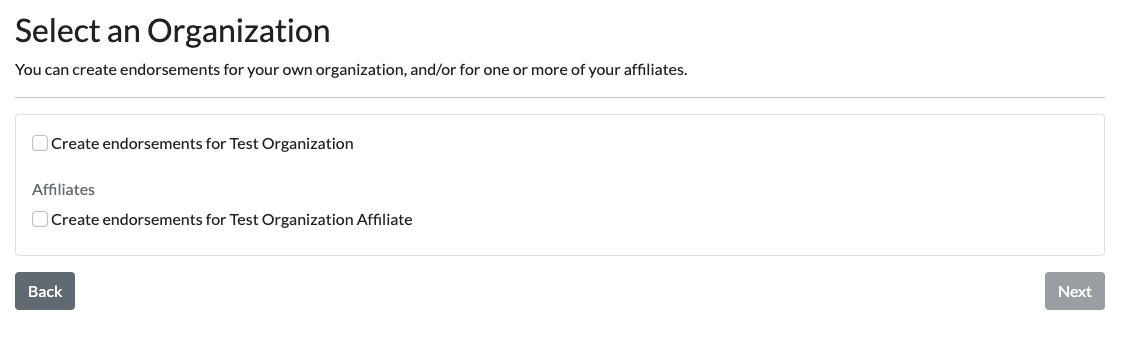
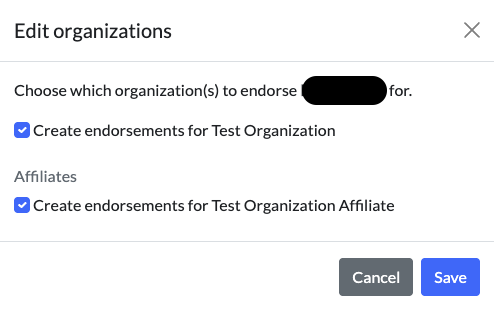
Yes! You can choose the organization and any affiliates in the first screen of the endorsement flow or you can edit your endorsements at the end of the flow on an endorsement by endorsement basis.
How do I endorse more than one candidate for the same position?
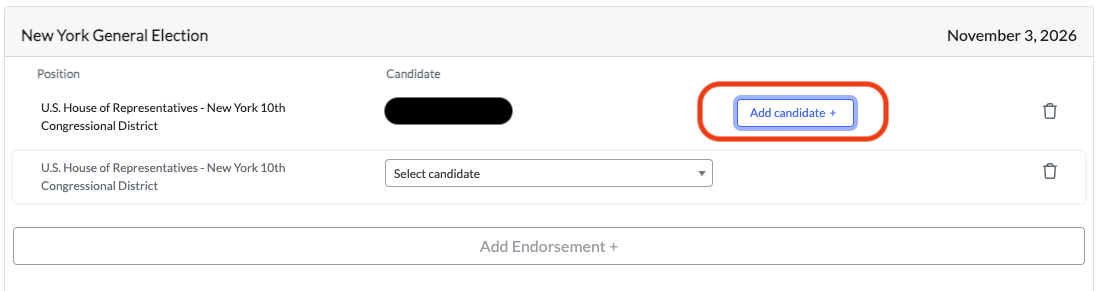
Once you've completed an endorsement for the position, you can click on the "Add Candidate +" button to create a new endorsement for the same position.
Can I input many endorsements at the same time?
Not at this time. Please share your feedback with your Client Success Lead if this option is of interest to you.
Can I endorse across elections in the same workflow?
Not at this time. Please share your feedback with your Client Success Lead if this option is of interest to you.
For more information about the endorsement process, please reach out to your Client Success Lead.